Weather data & microclimate :
- 4.7
- Rating
- 10.00M
- Installs
- Free
- Price
 Analysis by App-foxy
I use weather apps for one simple reason: I want to make a better decision before I leave home, start a walk, plan a drive, or decide whether outdoor work can wait. Weather Underground takes that practical need and gives it a more local, observation-focused approach than a basic forecast app. It is a free weather application from Weather Underground, with radar, maps, local tracking, and weather-station information at its center.
My overall impression is that it is most useful when a broad city forecast is not quite enough. The temperature outside my home can differ noticeably from the official reading shown for the center of town, and this app is designed around that kind of local variation. It is not the cleanest choice for someone who only wants to glance at tomorrow’s high and low, but it becomes much more interesting when I want to compare nearby conditions, watch a storm develop, or understand what is happening around a specific location.
How the app feels in everyday use
The first thing that stands out is the emphasis on hyperlocal weather rather than a single generalized forecast. The store summary highlights weather radar, a hyperlocal tracker, and weather maps, and that description matches the way I think about the app after using it. Instead of treating an entire city as one uniform weather area, it encourages me to look closer at the conditions around a selected place and follow the station that seems most relevant.
You May Also Like

 Blood Strike: 2.5 Anniversary
Blood Strike’s Loadouts Turn Every Drop Into a Tactical Gamble
A close look at Blood Strike’s custom loadouts: how fast access to signature weapons reshapes its battle royale rhythm, rewards preparation, and narrows the gap between fights.

 Pandora - Music & Podcasts
Pandora’s Music Is Easy to Start, but Harder to Recover
Pandora’s strength is its low-effort path from a seed to a station. Its weak spot is how much confidence it asks you to place in connection, setup, and quiet recovery.

 8 Ball Pool
 Is Built on Rivalries, Rematches, and Routine
A close look at the rivalries, rematches, shared routines, and unanswered safety questions that turn a quick pool match into a persistent mobile community.

 Samsung Music
’s Quiet Strength Is Playing What You Already Own
Its reach comes less from spectacle than from dependable access to a personal library. That simplicity is both the app’s strongest retention engine and its ceiling.

 AccuWeather: Weather Radar
AccuWeather Review: A Quick, Clear Forecast for Everyday Decisions
For everyday plans, the best forecast is the one you can understand quickly. AccuWeather makes rain timing, radar, and local conditions easy to act on, with a few trade-offs.

 Hill Climb Racing
Why Hill Climb Racing Still Turns Crashes Into One More Run
A tiny car, a bumpy hill and one more upgrade: Hill Climb Racing keeps resurfacing because its simple chaos makes every near-miss feel personal.
More From Our News Desk
View All News


That approach is valuable in neighborhoods with different elevations, open fields, coastlines, valleys, or dense buildings. A forecast for a large metropolitan area can be technically correct while still feeling wrong at street level. With this app, I can investigate whether the weather near my home, workplace, or planned destination is behaving differently from the wider regional forecast.
The interface is more information-oriented than minimalist. I do not open it expecting a single oversized number and nothing else. I expect several layers of context: current conditions, forecast information, map views, and station-related details. That makes it better suited to people who enjoy checking the reasoning behind a forecast, not just reading a quick prediction.
There is also a useful distinction between checking the weather and monitoring it. A quick check answers, “Should I take a jacket?” Monitoring asks, “Is that rain band moving toward me, and is the nearby station already showing a change?” Weather Underground is stronger at the second task. I can return to the same location and build a more informed picture instead of treating every launch as an isolated glance.
Why local stations change the experience
The station-centered design is one of the app’s more meaningful strengths. Official forecasts are usually produced for broad areas, while personal weather stations can offer a closer look at what is happening in a particular part of town. That does not mean every nearby reading should be accepted blindly. A station may be affected by shade, rooftops, surrounding pavement, garden placement, or other local conditions.
For me, the useful habit is comparison. I look at the station closest to where I am, then consider whether another nearby station tells a similar story. If several readings line up, I feel more confident that the local pattern is real. If they differ sharply, that difference is itself useful: it tells me that conditions may be changing quickly or that the immediate surroundings matter.
This is a more thoughtful workflow than simply trusting the first number on the screen. It is especially helpful for people who care about gardening, cycling, running, photography, commuting, or outdoor jobs. The app does not remove uncertainty, but it gives me more evidence to work with.
Radar and maps for decisions, not decoration
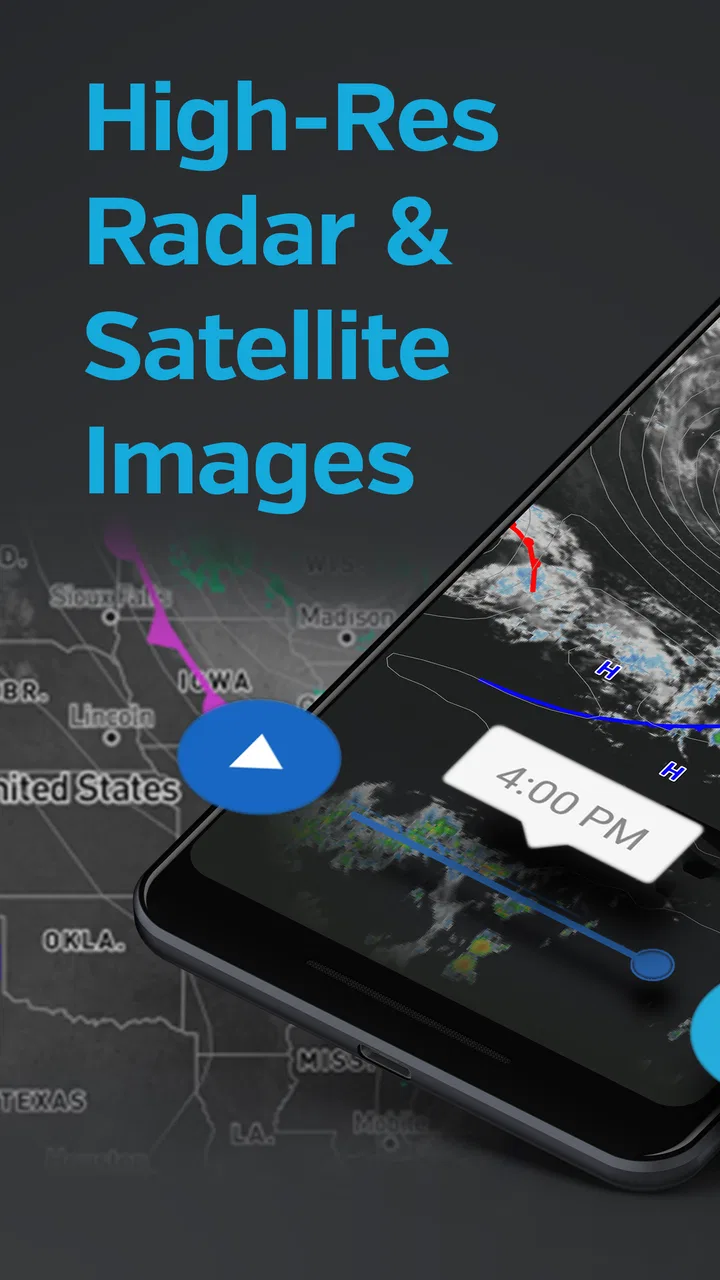
Radar is most valuable when I use it to answer a specific question. If rain is forecast later, I can check whether the approaching area of precipitation appears to be moving toward my route. If the sky is already dark, a map can help me judge whether the weather is part of a larger system or a brief local shower. The map view is therefore more useful than a static icon when timing matters.
One practical tip is to check the map before leaving rather than waiting until I am already outside. I can compare the wider pattern with the conditions at the selected station, then decide whether I need to change the timing of a walk or bring extra protection. This is a small workflow, but it makes the app feel like a planning tool instead of a passive display.
Maps can also create false confidence if I read them too literally. A radar image is not a promise that every drop will land exactly where the colors suggest, and local terrain can alter the experience. I treat the map as evidence about movement and intensity, not as a guarantee. That distinction is important for anyone using the app for travel or outdoor work.
What the free version means for value
The app is free to install and has a content rating of Everyone, so the basic barrier to trying it is low. That matters because weather needs vary from person to person. I can install it, explore the station view and maps, and decide whether the information style suits me without committing to a purchase first.
There are in-app purchases priced from $1.99 to $19.99 per item. I would not describe the app as requiring payment simply to understand its main purpose, but I would pay attention to which parts of the experience are available without spending and which extras are presented as optional purchases. The practical value of the free access depends on whether the core station and map workflow already covers my needs.
That is the right way to judge the cost: start with the free experience and ask whether it improves a real decision I make regularly. If I only need a basic forecast, paying for additional weather features may not add enough value. If I repeatedly use local observations and map views, a paid option could be easier to justify, but the decision should come from my own usage rather than from the size of the feature list.
Where it beats a standard weather app
A typical built-in weather app is usually faster for a quick glance. It may show the current temperature, a simple forecast, and an alert in a very compact layout. I prefer that kind of app when I am rushing out the door or checking several cities quickly.
Weather Underground earns its place beside those simpler tools by going deeper into local conditions. Its combination of weather stations, radar, and maps gives me more context than a single forecast card. The trade-off is that I need to spend more time looking. The app is not necessarily better at every weather question; it is better at questions where location and changing conditions matter.
It also differs from a purely official-alert service. For serious warnings, I would still pay attention to trusted emergency communications and local authorities rather than relying on a general-purpose weather app alone. Weather Underground can help me understand the surrounding conditions, but it should not be my only source during dangerous weather.
A realistic morning routine
Imagine that I have planned a morning bike ride. I first check the selected location for the broad forecast, then look at the nearby station to see whether current conditions match what the regional prediction suggests. After that, I open the radar or map view and look for precipitation along the route and around the time I expect to be outside.
If the local station is already showing conditions that differ from the city forecast, I do not automatically cancel. I use the difference as a prompt to investigate further. Maybe the route crosses a more exposed area, or perhaps the weather is changing faster than expected. I might leave earlier, choose a shorter route, or carry a light rain layer. The app is useful here because it supports a chain of small decisions rather than offering only a yes-or-no answer.
The same process works for gardening. I can check the local reading before watering, compare it with the broader forecast, and watch the map if rain appears likely. For outdoor work, the station view can help me notice that conditions near the job site are different from those at home. These are modest benefits, but they are exactly the kind that make a weather app worth opening repeatedly.
Limitations I noticed in the workflow
The extra detail can become friction. When I only want a quick answer, station information and map layers may feel like more than I need. Someone who prefers a calm, uncluttered interface could find the experience less comfortable than a simpler alternative.
Local readings also require judgment. A station close to me is not automatically the best station for every purpose. A rooftop location may not represent a nearby park, while a station in an open area may feel different from a sheltered residential street. I appreciate having more choices, but that choice creates responsibility: I need to understand what I am comparing instead of treating every reading as equally representative.
Another limitation is that detailed weather information can encourage overchecking. I can easily move from a useful glance into repeatedly refreshing maps and comparing small changes that will not affect my decision. My best experience comes from deciding in advance what I need to know: current local conditions, precipitation movement, or a forecast for a destination. Without that discipline, the app can turn a simple question into a long browsing session.
People who need a weather tool mainly for severe-weather safety should also keep their expectations realistic. Radar and local observations are helpful context, but they are not a replacement for official warnings, emergency instructions, or common sense. If conditions are dangerous, I would use the app as one supporting source and follow authoritative guidance first.
Who will get the most from it
I think the strongest audience is anyone whose plans depend on small weather differences. Runners, cyclists, hikers, gardeners, photographers, commuters, and outdoor workers can all benefit from checking a nearby station rather than relying only on a broad city forecast. People living in areas with rapidly changing conditions may appreciate the map and radar views even more.
It is also a good fit for curious users who like to understand weather instead of simply receiving a prediction. Comparing stations can teach me how much conditions vary across a short distance. Over time, I become better at recognizing which local reading is useful for my home and which one is more relevant to a destination.
Families may find the Everyone content rating convenient, particularly when several people share a device or want a weather reference without an age-specific presentation. The app has been available since December 19, 2011, and its current version is 6.19.1, which gives it a long-running presence in the category. It requires Android 8.0 or later, so compatibility is worth checking before installation on an older phone.
I would be less inclined to recommend it to someone who wants the smallest possible forecast widget, a completely distraction-free screen, or a weather app that never asks the user to interpret local differences. For that person, a built-in phone weather service may be faster and more comfortable. I would also suggest caution for anyone who expects a weather app to provide professional-grade certainty for high-risk decisions.
Reputation and practical confidence
The app has an average rating of 4.8 from around 612 thousand ratings, and it has more than 158 thousand written reviews. It has also passed 10 million installs. Those figures do not prove that every user will enjoy the interface, but they do suggest that the station-based approach has found a substantial audience.
What matters more to me is whether the app’s popularity matches a clear use case. In this case, the answer is yes: people who want hyperlocal information have a reason to choose it over a generic forecast screen. The high rating is encouraging, but I would still judge it by the way I plan to use it. A well-regarded app can remain the wrong fit if its depth feels unnecessary.
My buy-or-skip verdict
I would start with the free version and keep it if I regularly check radar, maps, or nearby station conditions. The free entry point makes that trial straightforward, and the app delivers more local context than the usual quick forecast tool. For my own use, its strongest value comes from combining a nearby observation with a moving weather map before I commit to an outdoor plan.
I would consider an in-app purchase only after the free experience had become part of my routine and I understood exactly what extra value I was receiving. Since individual purchases range from $1.99 to $19.99, I would avoid paying automatically just because an upgrade is available. The sensible test is whether the added option saves time, improves a recurring decision, or removes a genuine annoyance in my personal workflow.
My recommendation is simple: choose Weather Underground when local detail matters more than instant simplicity. It is a capable weather app for station comparisons, radar checks, and map-based planning, with enough depth to support everyday outdoor decisions. Skip it if you only want a fast temperature glance or if you dislike interpreting several sources. For everyone in between, the free version is worth trying first, and its value becomes clear once I use it to make a real plan rather than merely browse the forecast.
FAQs for Weather data & microclimate :
01What features does the Weather Data & Microclimate app offer?
The Weather Data & Microclimate app provides detailed weather forecasts, including temperature, humidity, wind speed, and precipitation chances. It also offers microclimate data, real-time radar, and severe weather alerts to keep users informed about sudden changes. Users can customize notifications and access historical weather data for in-depth analysis.
02How accurate is the weather forecasting in this app?
The app utilizes advanced meteorological models and data from reliable sources to ensure high accuracy. It offers real-time updates and leverages microclimate information to provide localized forecasts. While no forecasting tool can be 100% accurate, this app is renowned for its precision and reliability, especially in urban areas.
03Is the app free to use, or does it require a subscription?
The Weather Data & Microclimate app offers a free version with essential features. However, for access to premium features such as ad-free experience, advanced radar options, and extended forecast data, a subscription may be required. Users can choose from various subscription plans that best suit their needs.
04Can I customize the weather alerts and notifications?
Yes, the app allows users to fully customize alerts and notifications. You can set specific parameters such as temperature thresholds, storm warnings, or severe weather alerts. This ensures you receive tailored notifications that are relevant to your location and personal preferences, helping you stay prepared.
05Does the app support multiple locations for weather updates?
The app supports multiple locations, allowing users to monitor weather conditions in various places simultaneously. This feature is particularly useful for frequent travelers or those who wish to keep track of weather conditions in different cities or regions. Simply add your desired locations to receive up-to-date forecasts.
Pros
- Accurate weather predictions daily.
- User-friendly interface and design.
- Real-time weather alerts feature.
- Detailed microclimate information.
- Supports multiple locations tracking.
Cons
- Occasional in-app ads interrupt flow.
- Premium features require subscription.
- Some data requires strong internet.
- Limited offline functionality.
- Battery consumption can be high.

Weather data & microclimate :
Gallery